How to Optimize Your Product Pages

As an ecommerce store, driving traffic to your website is only half of the battle. That in itself is a tall task, but so much more needs to be done in order for you to actually generate sales.

Take a moment to put yourself into the minds of the consumers.

Clearly, they’re somewhat interested in whatever you’re selling. Maybe they found you from an organic search of a product they need or maybe they clicked on a PPC advertisement. It’s possible that they found your site from a social media campaign.

The way they found you really doesn’t matter. What’s important is that they landed on your site because of interest.

You’ve done a great job of setting up your site navigation, making it easy for visitors to find exactly what they’re looking for. This brings them to the product page, which is what we’ll be focusing on in this guide.

Here’s what you need to realize. When a website visitor lands on your product page, they’re often just a click away from completing the purchase process. But that won’t happen if those landing pages aren’t optimized for conversions.

Failure to properly design and optimize product pages is a mistake that I see ecommerce sites make all of the time. That’s what inspired me to write this guide.

I’ll explain everything you need to know about crafting product pages that drive conversions.

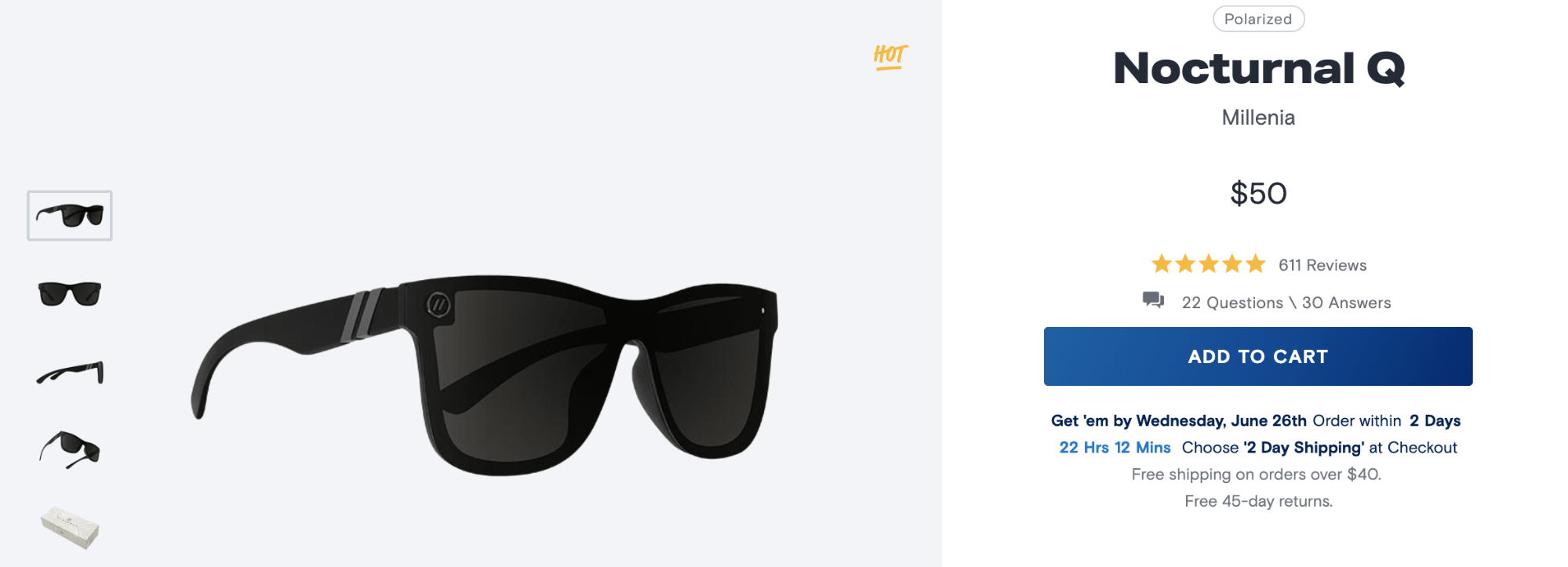
Elements of a product page

Before we continue, I want to make sure you underst… Read More
The Top 10 Widgets to Improve Your Website

If you’re new to building and managing websites, you need to get yourself familiar with widgets as soon as possible.

What’s a widget?

Simply put, it’s website component that adds features or functionality to your site. Widgets are embedded directly onto your site, but you don’t have to develop or code them on your own.

To install a widget on your website, it’s as simple as copying and pasting some code, which will be provided by the creator of the widget. There will usually be a sufficient set of instructions for how and where to install the code from your widget-provider.

Why do you need widgets on your website?

Here’s the thing. Websites can functionally operate without widgets. But I’m sure you’ve landed on websites and wondered how they were able to add so many cool features and functionality to their pages. In many instances, they probably used a widget.

Your website builders and content management systems will be somewhat limited. Widgets fill in all of the blanks that aren’t provided by those platforms.

Widgets come in all shapes and sizes. They range from clocks, to weather feeds, and translators. But depending on the type of website you have, adding a clock or weather icon to your site doesn’t really add much value to your visitors.

That’s what inspired me to write this guide. I’ve come up with a list of the top 10 widgets that add real value and functionality to improve your w… Read More

11 Reasons to Use WordPress For Your Website

If you’re starting to build your first website, WordPress is inevitably a name that you’ve come across. I’d recommend it to nearly anyone who has any type of website.

But before I get into the reasons why WordPress is so great, I want to clear up any misconceptions about the platform.

What exactly is what WordPress?

You don’t host your website with WordPress. You’ll still need to find a web hosting provider for that service.

WordPress is a content management system (CMS for short). It’s a robust tool for creating and managing your website. Blogs, business websites, personal sites, and ecommerce stores alike can benefit from using WordPress.

This platform is run online, meaning you don’t need to download any desktop software to use it.

So now that you have a better understanding of what WordPress is and what it does, it’s time to talk about why it’s so great. I’ve come up with 11 reasons why you should be using this platform for your website.

By the end of this post, I’m sure you’ll be convinced that WordPress is the best CMS for you.

1. Reliability

You don’t want to take any chances when it comes to managing your website. Sometimes, looking at how many people use a platform is the best way to determine its reliability.

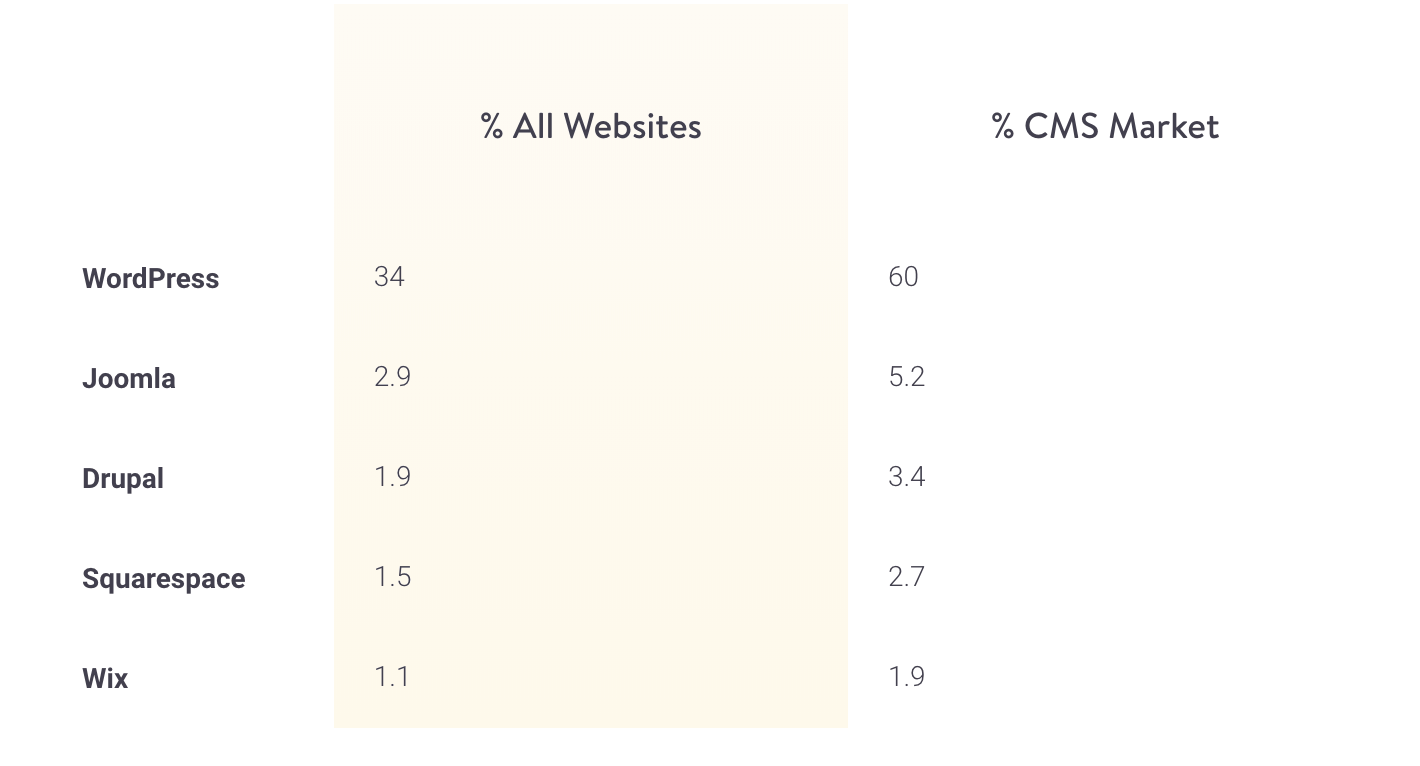
According a recent study from Kinsta, WordPress dominates the CMS market share.

The Beginner’s Guide to CSS

If you currently have a website or plan to build a website, CSS is definitely a term that you’ve come across. But for those of you who don’t know how to code and don’t have any development experience, it can be a little confusing.

Let me start with the basics.

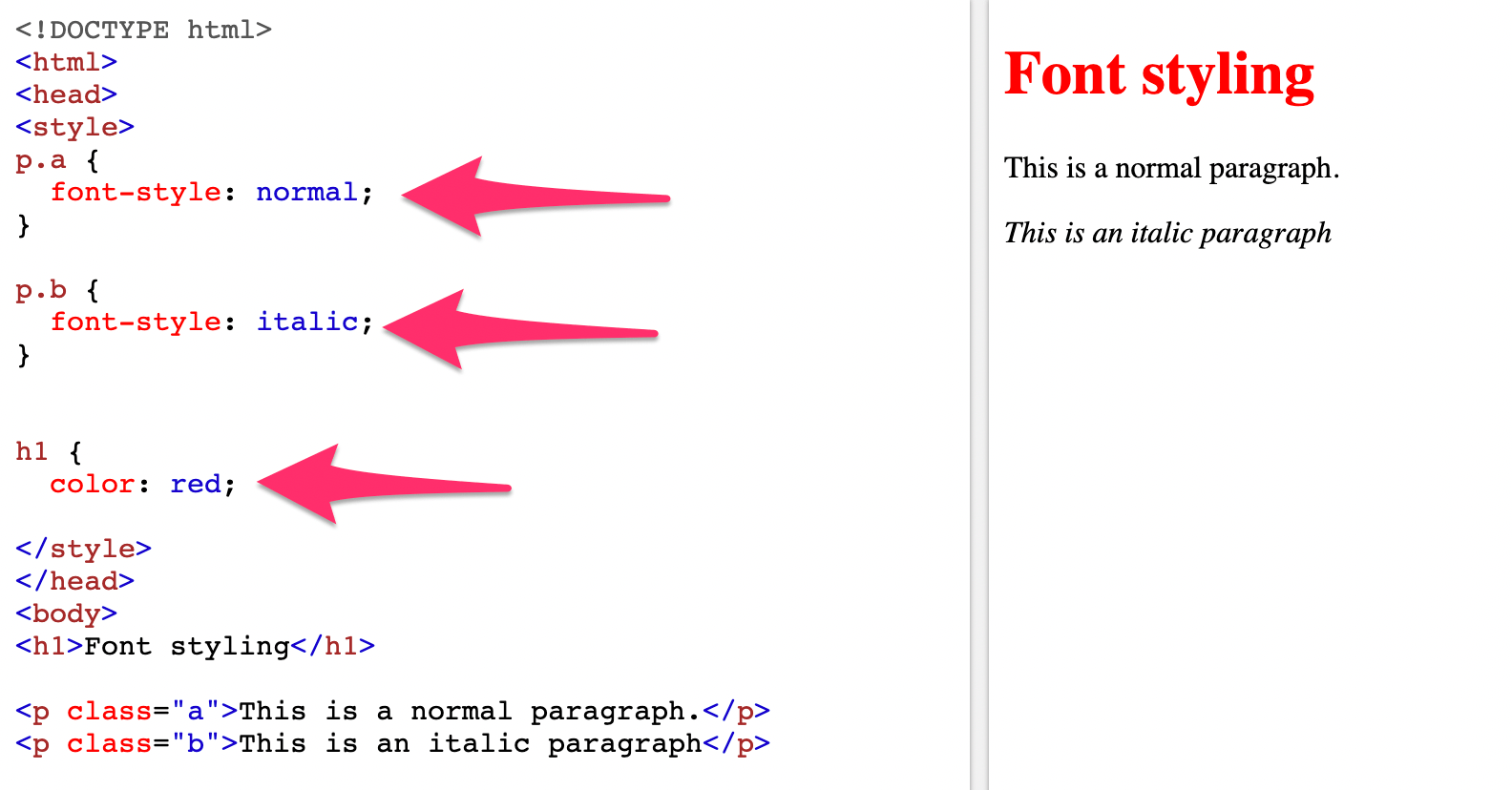
CSS stands for cascading style sheets. It’s a stylesheet language that describes the appearance or presentation of a website. Essentially, CSS tells web browsers how each element in an HTML document should be displayed.

Along with JavaScript and HTML, CSS is a crucial component to every web page on the Internet.

The main benefit of CSS is the ability to separate website content from the design elements, simply by changing rules in a CSS file.

Before CSS was used, nearly every attribute related to how HTML documents were displayed was written in HTML markup. This means that so many rules had to be repeated throughout the HTML code.

But CSS makes it possible for developers to move that information into a style sheet, which simplifies the HTML.

As a result, the HTML is shorter, lighter, and less prone to errors. It also makes your HTML much easier to maintain.

In this guide, I’ll give you some common use cases for CSS and show you my favorite ways to learn CSS online.

CSS common uses

There are lots of different ways to use CSS on your website. But I want to show you some of the more basic and common applications so you can get familiar with… Read More

9 Popular Ecommerce Products to Sell Online in 2019

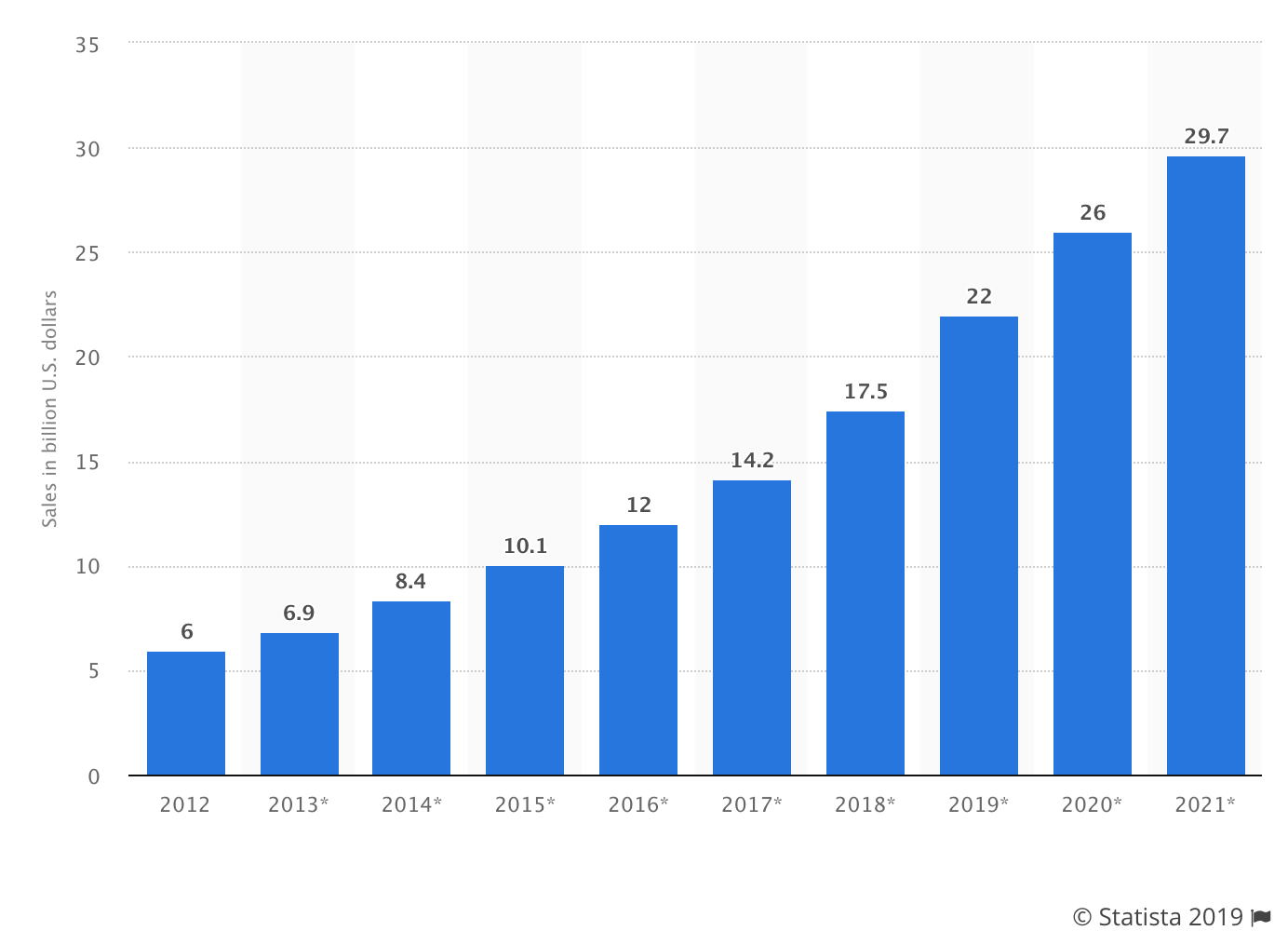
The ecommerce industry is booming.

People are buying products online more than ever before. Nearly anything you can imagine can be purchased on the Internet and delivered to your doorstep. It’s a great time to be a consumer.

But as an entrepreneur, you can leverage this craze by creating your own ecommerce shop.

You can take advantage of this opportunity and start an online store from virtually anywhere with Internet access. While technology has made it easier than ever for consumers to buy, it’s also easier than ever before to start an online business.

Sure, there are a handful of things that you need to figure out. You’ll have to create a website, choose an ecommerce platform, pick a web hosting service, and learn how to market your brand online.

But before you get ahead of yourself and start all of that, you need to figure out what you’re going to sell.

Lately, I’ve been talking to so many entrepreneurs who want to sell online, but they just don’t know what to offer. That’s what inspired me to write this guide.

Using in-depth research and trend analysis, I’ve come up with a list of nine popular products that you can sell online in 2019. Use this guide as an inspiration for your ecommerce shop.

1. Groceries

When most people think about selling products online, they automatically think of new gadgets or products that are designed for everyday use around the house. Or they try to think of somet… Read More