How to Get Blog Comments: 12 Questions To Ask Yourself

One of the biggest worries bloggers have is the silent blog syndrome. After putting endless hours of hard work into your blog, you find that it remains silent. No one comments. No one argues. No one praises. It’s a dark and lonely place.

How do you get people to comment on your blog? What tricks, techniques, and powers of persuasion must you possess? A quiet blog can be depressing, while an active blog is exciting. Once people start chiming in, sharing tips, arguing points, and having a conversation, you feel as if your blogging existence has finally been validated.

Getting more blog comments requires patience and consistency but I have provided you with 12 simple questions to ask yourself in order to help you increase comments on your blog with ease.

Answer these 12 simple questions to start getting more comments.
1. Do you have a bad comment system?

Let’s start at the ground floor. Can people easily leave a comment? If not, that’s a problem.

I know there are blogs where I would be willing to leave a comment, but I just can’t do it because of a broken comment system. Maybe the Captcha code isn’t working. Or I’m forced to choose an avatar. Or I have to log in to some system. Or I have to wait for the moderator to approve my comment. Or I don’t even know where to click to leave a comment.

All… Read More
The Complete Guide To Social Media Marketing For Bloggers

In this guide, we’re going to discuss some key ways you can build traffic to your blog once you have your social media communities established. It’s part of the complete guide to building your blog audience.

Most people assume that social media sharing is easy. Yet many blog owners find that it requires quite a bit of effort to do more than share every blog post on social media.

We’ll show you tactics that will allow you to get the most out your efforts to market your blog posts on social media. These are tactics that have worked to help build some of the biggest blogs on the Internet.

Let’s get started.

The Best Social Networks For Promoting Blogs

It seems that new social networks come out every month. There are big social networks and niche social networks. There are tons of opportunities for you to promote you blog on every one of the social networks, but for most people it’s not reasonable to try to use them all.

Some have tried using every social network, but the common result is multiple accounts with little to no interaction.

A better strategy is to focus on just a couple social networks or even one social network.

Here is how you can determine the best social network for promoting your blog.

Step 1 – Identify Your Target Reader

Some people use a lot of social networks. Some use only one or two social networks.

Your task is to identify your target reader and then identify the… Read More

Page Speed Optimization: Metrics, Tools, and How to Improve

Posted by BritneyMuller

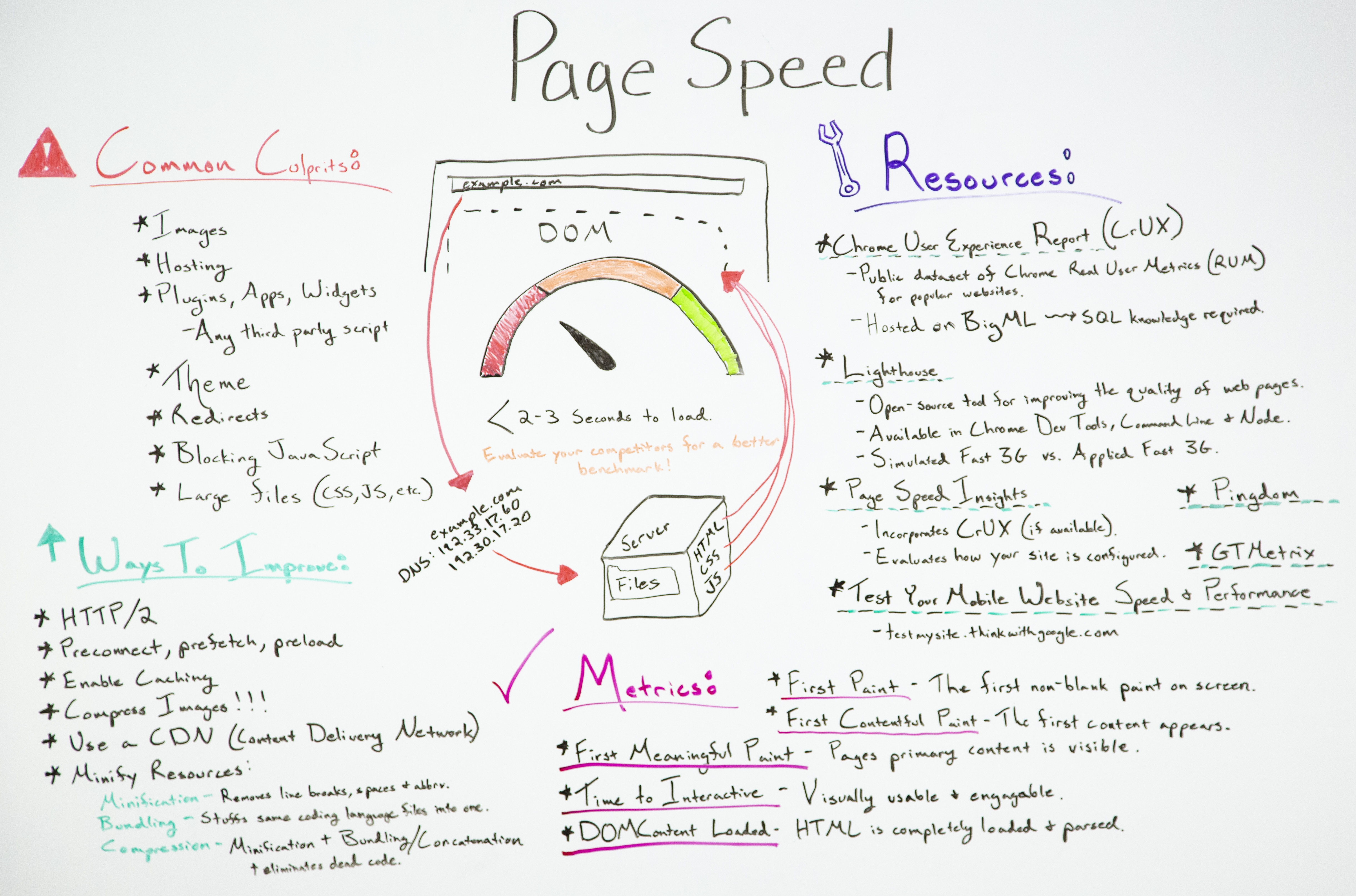
Page speed is an important consideration for your SEO work, but it’s a complex subject that tends to be very technical. What are the most crucial things to understand about your site’s page speed, and how can you begin to improve? In this week’s edition of Whiteboard Friday, Britney Muller goes over what you need to know to get started.

Click on the whiteboard image above to open a high resolution version in a new tab!

Video Transcription

Hey, Moz fans. Welcome to another edition of Whiteboard Friday. Today we’re going over all things page speed and really getting to the bottom of why it’s so important for you to be thinking about and working on as you do your work.

At the very fundamental level I’m going to briefly explain just how a web page is loaded. That way we can sort of wrap our heads around why all this matters.

How a webpage is loaded

A user goes to a browser, puts in your website, and there is a DNS request. This points at your domain name provider, so maybe GoDaddy, and this points to your server where your files are located, and this is where it gets interesting. So the DOM start… Read More

Blogging and SEO: 5 Easy Steps to Rank Your Blog

Organic search remains an important way to generate traffic for your blog.

It’s an essential part of blog marketing and in the following post we’ll show you the steps and tools you need to optimize your posts to help rank your blog.

Let’s get started.

1. SEO friendly blog design

Did you know that building a beautifully-designed website can be just as important to search engine rankings as site architecture and knocking out high-quality content?

It’s true.

But what exactly should you pay attention to? To help you, I’ve put together a list of ten elements for good blog design that are also proven to help your search engine rankings.

1. Keep important content above the fold

This is pretty standard, and some would even argue that it’s not that important since people are trained to scroll, but in my own tests and the tests of others, I’ve seen it proven over and over again. So, keep the important information in those top 768 pixels. Research has shown that people do scroll, but they actually spend 80% of their time above the fold and only 20% below.

This brings us to the topic of sliders, which are pretty popular. I’m not a fan of sliders because they tend to confuse the user. When a user arrives on a page and the real estate above the fold is dominated by a slider, the hunt is on.

Read More

How to Transfer Your Website to Shopify

Without a doubt, Shopify is our recommended ecommerce tool.

But what if you’re already on another ecommerce tool and want to make the switch?

I put together this guide to help you transfer your store to Shopify in 4 easy steps. In mapping out these steps below, I’ve assumed a few things:

You already have a store built that’s generating revenue.
You want to keep that revenue going while you build your new store.
You have a domain that was purchased through another domain registrar and won’t be purchasing your domain through Shopify.

Let’s dive in.

Step 1: Build Your New Shopify Site

First let’s get your Shopify store built.

During this step, don’t worry about your new Shopify store conflicting with your old store. Your Shopify store will be locked behind a password so no one can see it until you’re ready to launch your new store. You’ll control when it becomes publicly accessible.

The store will be built on a Shopify subdomain which looks like company.myshopify.com so there won’t be any conflicts with your current store. Traffic and revenue will keep coming in like normal.

We have a complete guide on how to create your ecommerce store on Shopify here.

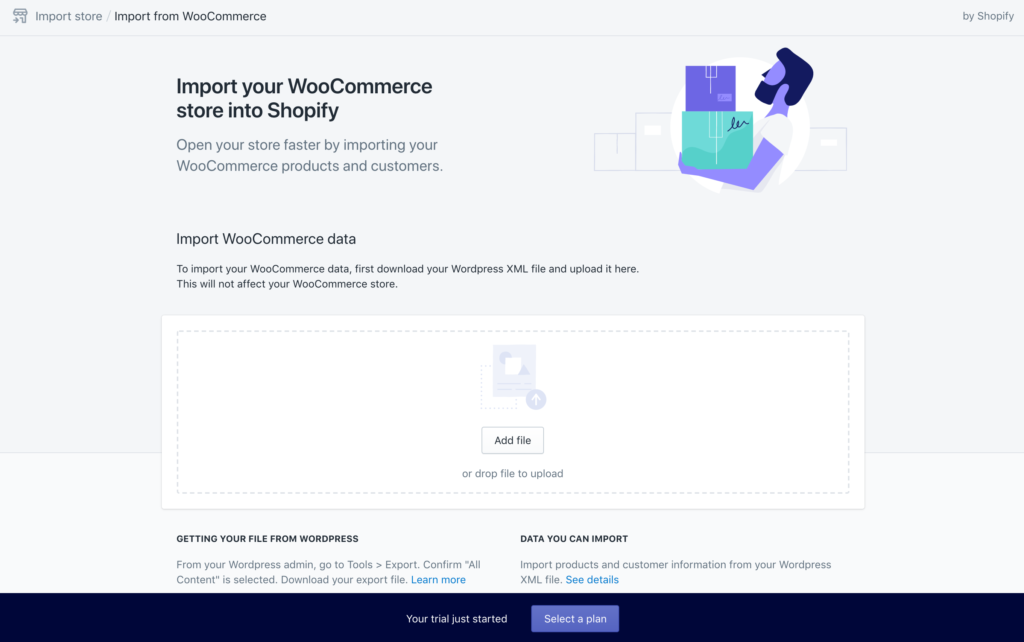
Most likely, you’ll have to build the store yourself. That means you’ll have to add the info for each product and page from your old store by hand. Yes, it’s definitely tedious but once it’s done, you’ll be so glad that you moved ev… Read More